InspectaESSign in

Your checklist, built with AI.

Type what you need to inspect and AI builds the sections and the questions. You review it, your team fills it in on their phones and Inspecta delivers the PDF report and the corrective actions, for any area.

  • AI checklists
  • Works without signal
  • Web and Android
  • 20 days free, no card

Create checklist with AI

Checklist subject

Forklift inspectionCommercial kitchen auditMonthly fire extinguisher checkWarehouse inspection

Details

Electric forklifts, daily checkWalk-in cooler and prep areaDry chemical and CO₂ unitsChemicals and spare parts

Size

ShortMediumFull

Your checklist appears here.Generating checklist…Draft ready: 3 sections · 8 questions

Before starting

  • Forks free of cracks and bends?Pass / Fail
  • Tire conditionGood · Fair · Poor
  • No hydraulic oil leaks?Pass / Fail

Operation

  • Service and parking brakes working?Pass / Fail
  • Horn and reverse alarm working?Pass / Fail
  • Hour meter (h)Number

Wrap-up

  • General observationsLong text
  • Operator signatureSignature

Your checklist appears here.Generating checklist…Draft ready: 3 sections · 8 questions

Storage

  • Walk-in cooler temperature (°C)Number
  • Food labeled with dates?Pass / Fail
  • Raw food kept apart from cooked?Pass / Fail

Hygiene

  • Handwash sink with soap and towels?Pass / Fail
  • Staff in hairnets and clean uniforms?Pass / Fail
  • Surface cleanlinessGood · Fair · Poor

Wrap-up

  • General observationsLong text
  • Manager signatureSignature

Your checklist appears here.Generating checklist…Draft ready: 3 sections · 8 questions

Location

  • Visible, signposted and unobstructed?Pass / Fail
  • Mounted at the right height?Pass / Fail

Condition

  • Gauge in the green zone?Pass / Fail
  • Pin and tamper seal intact?Pass / Fail
  • Hose and nozzle in good condition?Pass / Fail
  • Recharge due dateDate

Wrap-up

  • General observationsLong text
  • Signature of the person in chargeSignature

Your checklist appears here.Generating checklist…Draft ready: 3 sections · 8 questions

Aisles

  • Aisles clear and marked?Pass / Fail
  • Order and cleanlinessGood · Fair · Poor

Racking

  • Racks anchored and undamaged?Pass / Fail
  • Maximum load labeled?Yes / No / N/A
  • Chemicals with their safety data sheet?Pass / Fail
  • Fire extinguisher accessible?Pass / Fail

Wrap-up

  • General observationsLong text
  • Signature of the person in chargeSignature
Illustrative examples. AI builds a new checklist for each subject and you review it in the editor before saving.

Inspect, share, close.

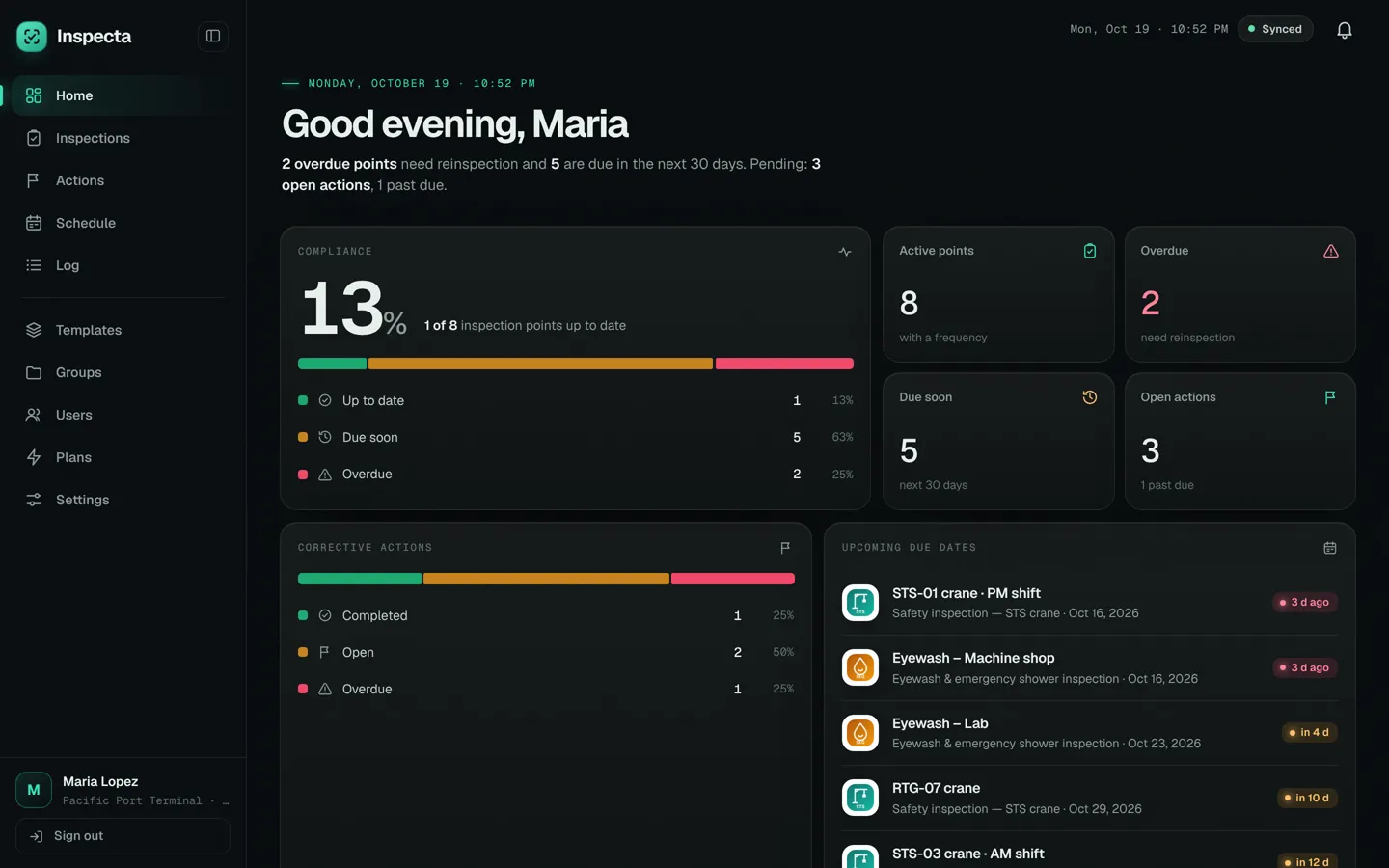
Every inspection point, on time. Inspecta is the inspection and audit app for any area that needs traceability: checklists on your phone, a PDF report when you finish and corrective actions with an owner and a due date.

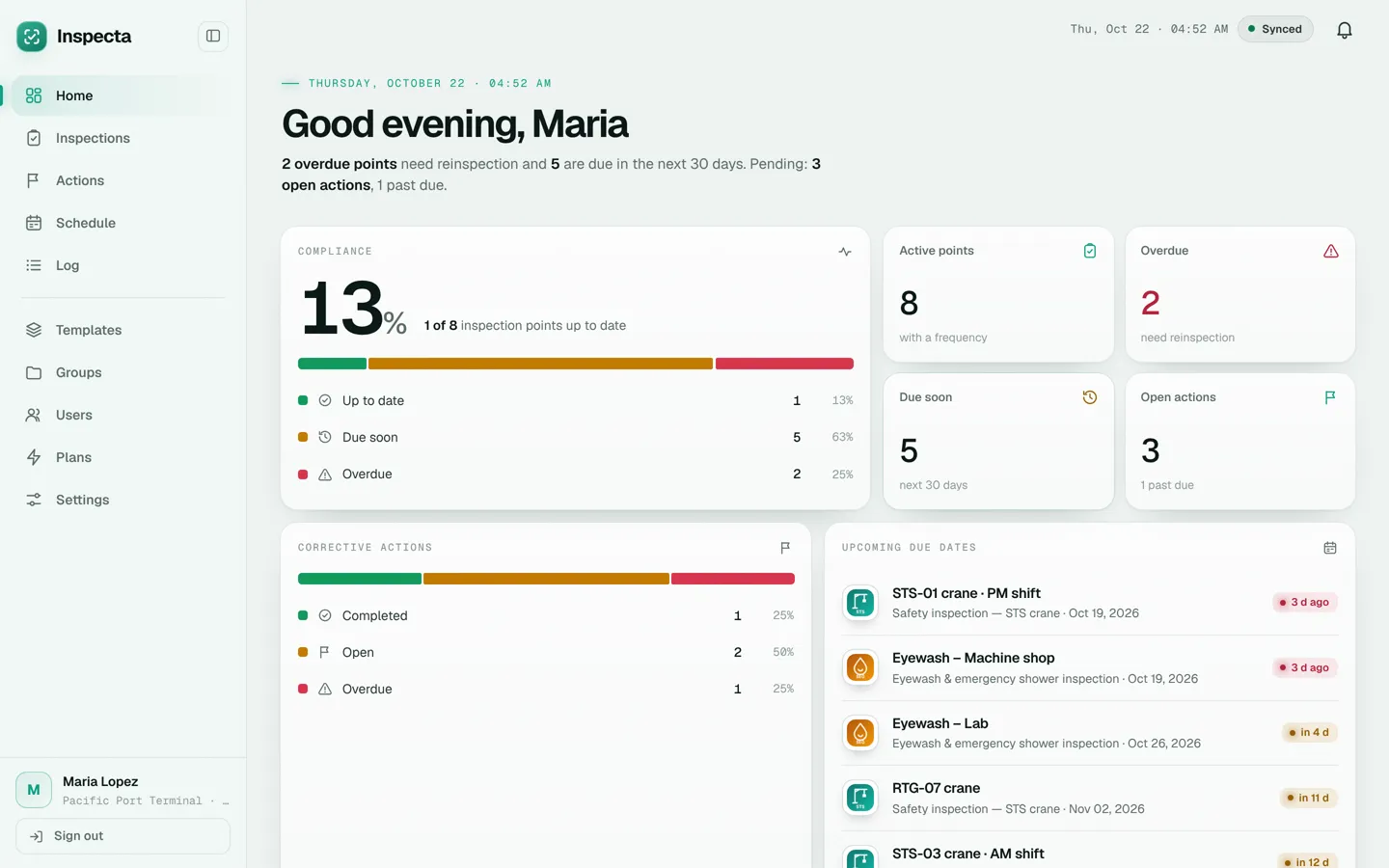
Inspecta home dashboard: inspection point compliance, open corrective actions and upcoming due datesInspecta home dashboard: inspection point compliance, open corrective actions and upcoming due dates

Inspect.

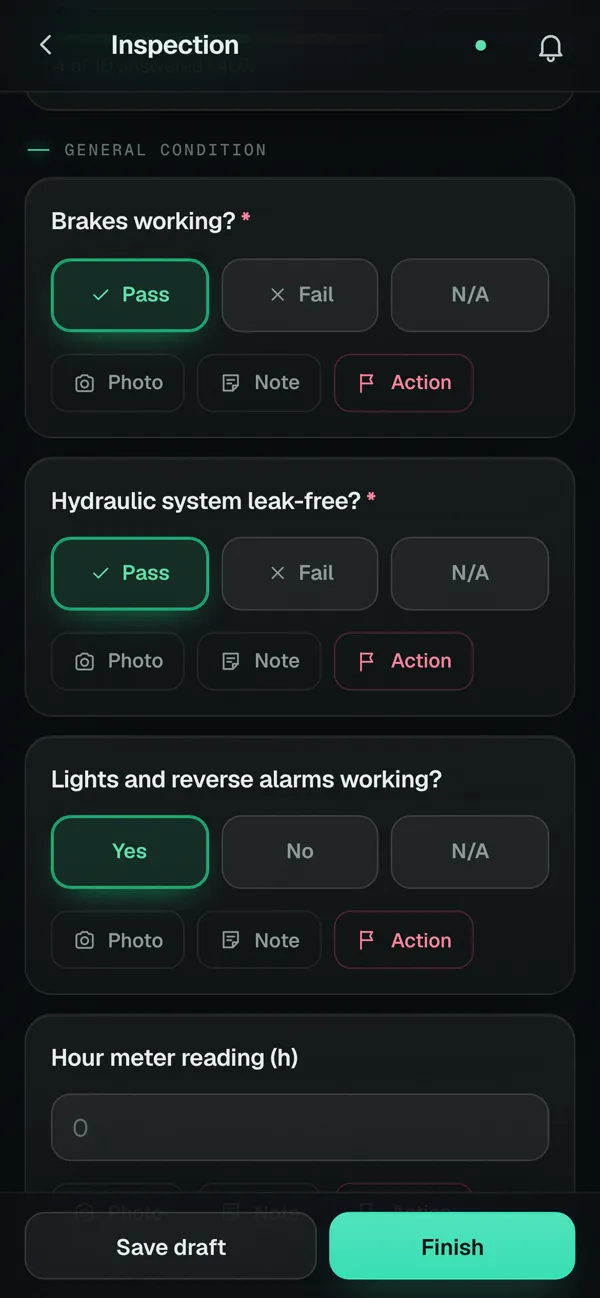
Your team opens the checklist on a phone and answers with a tap, even without signal. Every answer can carry a photo, note or signature.

  • Pass, Fail or N/A on every question
  • GPS location, date and inspector in the header
  • Syncs by itself when the network is back
Digital checklists
Checklist open on a phone with Pass, Fail and N/A answers, and photo, note and action buttonsChecklist open on a phone with Pass, Fail and N/A answers, and photo, note and action buttons

Share.

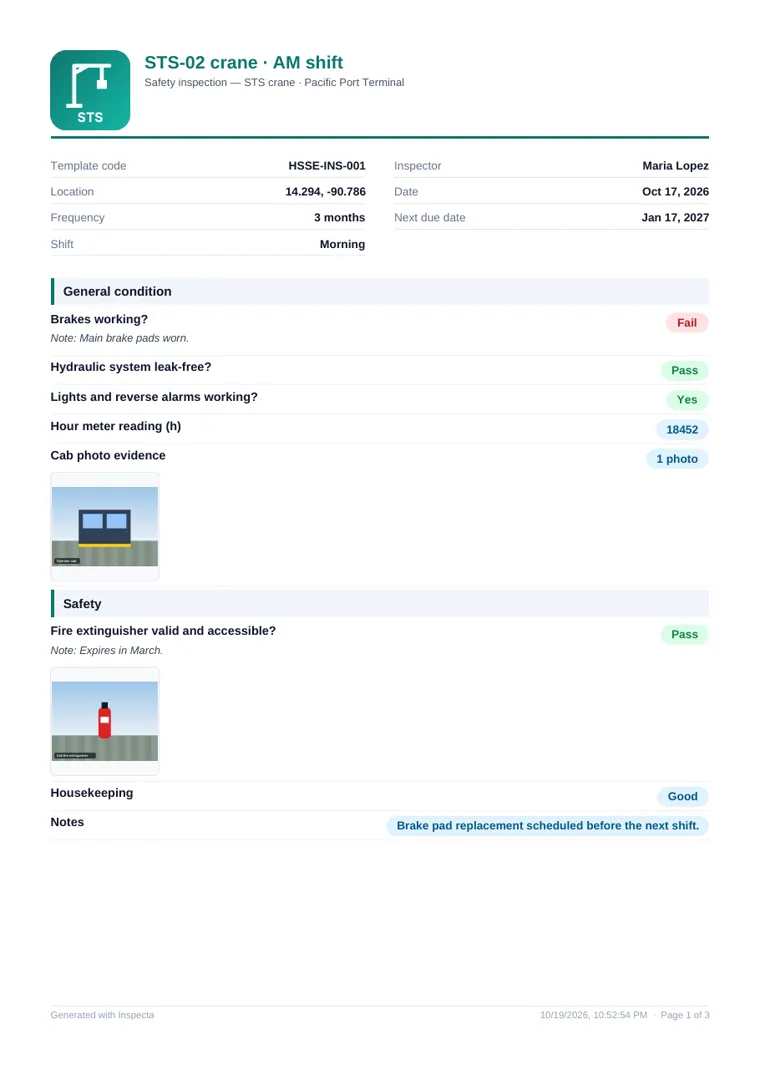
When you finish, Inspecta creates the PDF report with your logo, the answers, photos and signatures, ready to send the same day.

  • By email from the app, up to 3 recipients
  • By WhatsApp, email or Drive from the phone
  • Inspection history with month and year filters
Inspections and audits
First page of an inspection PDF report, with header, logo and results per question

Close.

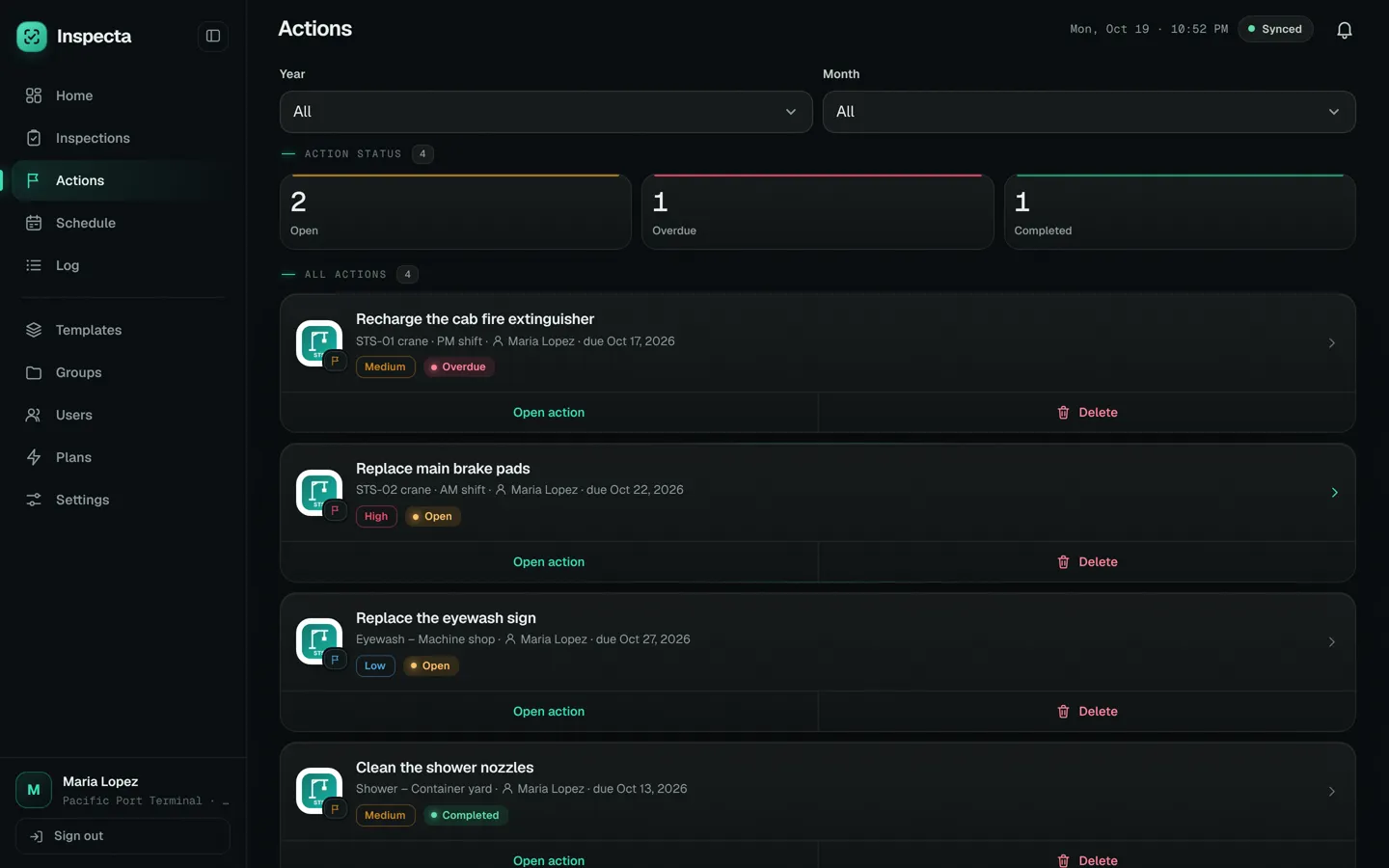
Anything that failed becomes a corrective action with an owner, due date and priority, tracked until it's completed.

  • Email notice to the owner
  • Open, overdue and completed at a glance
  • Proof photos when it's closed
Corrective actions
Corrective actions in Inspecta with priority, owner, due date and status: open, overdue or completedCorrective actions in Inspecta with priority, owner, due date and status: open, overdue or completed

For any area.

Not just safety and HSE: if a check repeats and you need to prove who did it and what they found, it fits in Inspecta. You build the checklist with the points of your procedure.

Inspections and audits by area
Safety and HSE
Safety walks, personal protective equipment, fire extinguishers, emergency equipment and work permits.
Quality
Process checks, finished product control and internal quality audits.
Maintenance
Preventive routines for machinery, equipment and facilities, with the date of the next check.
Food safety
Good manufacturing practices, cleaning and sanitation, and temperature logs.
Environment
Waste handling, spills, chemical storage and water and energy use.
Fleet and transport
Pre-use checks of vehicles, forklifts and mobile equipment before every shift.
Warehouse and logistics
Housekeeping, racking, goods receiving and dispatch.
Facilities and cleaning
Buildings, restrooms, common areas and general services.
Supplier audits
Visits with your own checklist, photo evidence and findings with follow-up.
Full traceability.

Every inspection is stored with everything an audit asks for.

Who
The inspector who did it and the signatures of everyone involved.
When
The inspection date, the next one based on its frequency and the history of earlier ones.
Where
The site or equipment inspected and the GPS or typed location.
What
Every answer with its notes and photos, in the PDF report.
What next
The corrective actions for each finding, with owner, due date and status.

Try it here.

This is a real question from a sample checklist. Tap «Fail» and watch the finding turn into a corrective action, just like in the app.

Safety · STS crane 02

Fire extinguisher charged and accessible?

PhotoNoteAction

Corrective action

Recharge the cab fire extinguisher

Owner
María López
Due
in 7 days
Priority
High

The owner gets an email notice.

Try it: tap «Fail».

Everything an inspection needs.

AI or your own checklists
AI builds them from a subject, or you create them from scratch: ten question types and a header with site, inspector, date, frequency, GPS, company, code and logo.
Due dates
Frequency from 1 month to 5 years per point, flagged 30 days ahead, with a yearly schedule.
Today's dashboard
Inspection point compliance, open actions and what's due soon, on one screen.
Roles
Admins create checklists and users; inspectors fill in the inspections.
Groups
Templates organized by area, process or client.
Notifications
In-app notices for the whole organization.
Backup
Data in the cloud for 4 years and JSON export whenever you like.
Two languages
The whole app in English or Spanish, with a dark or light theme.

Dark or light.

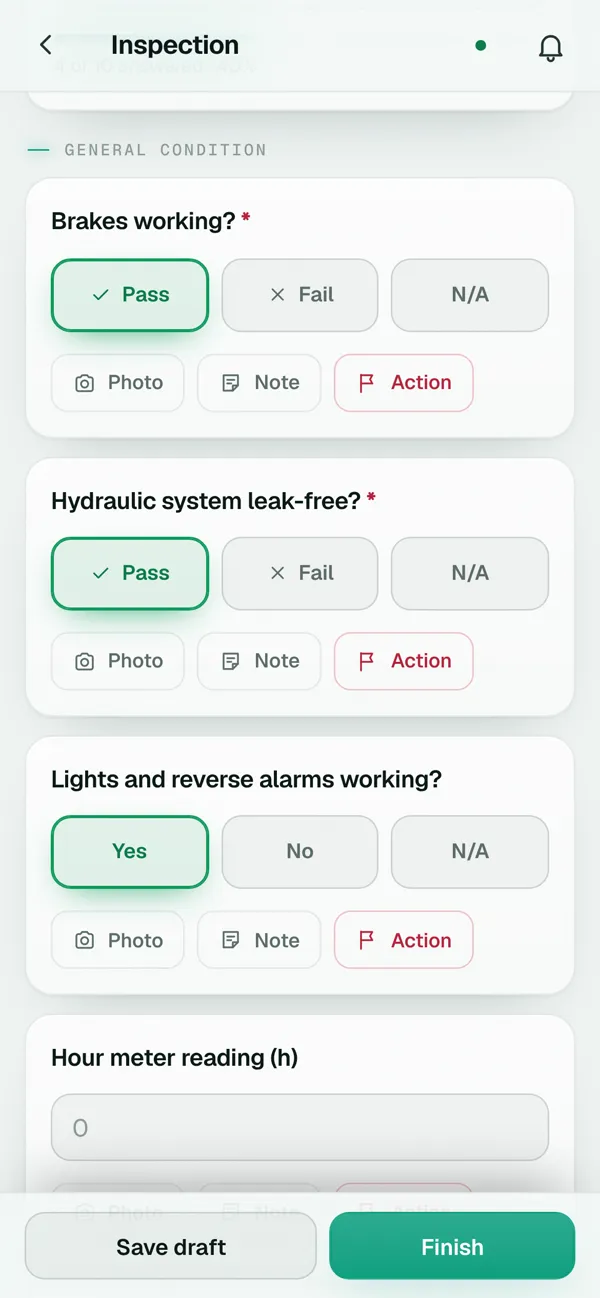
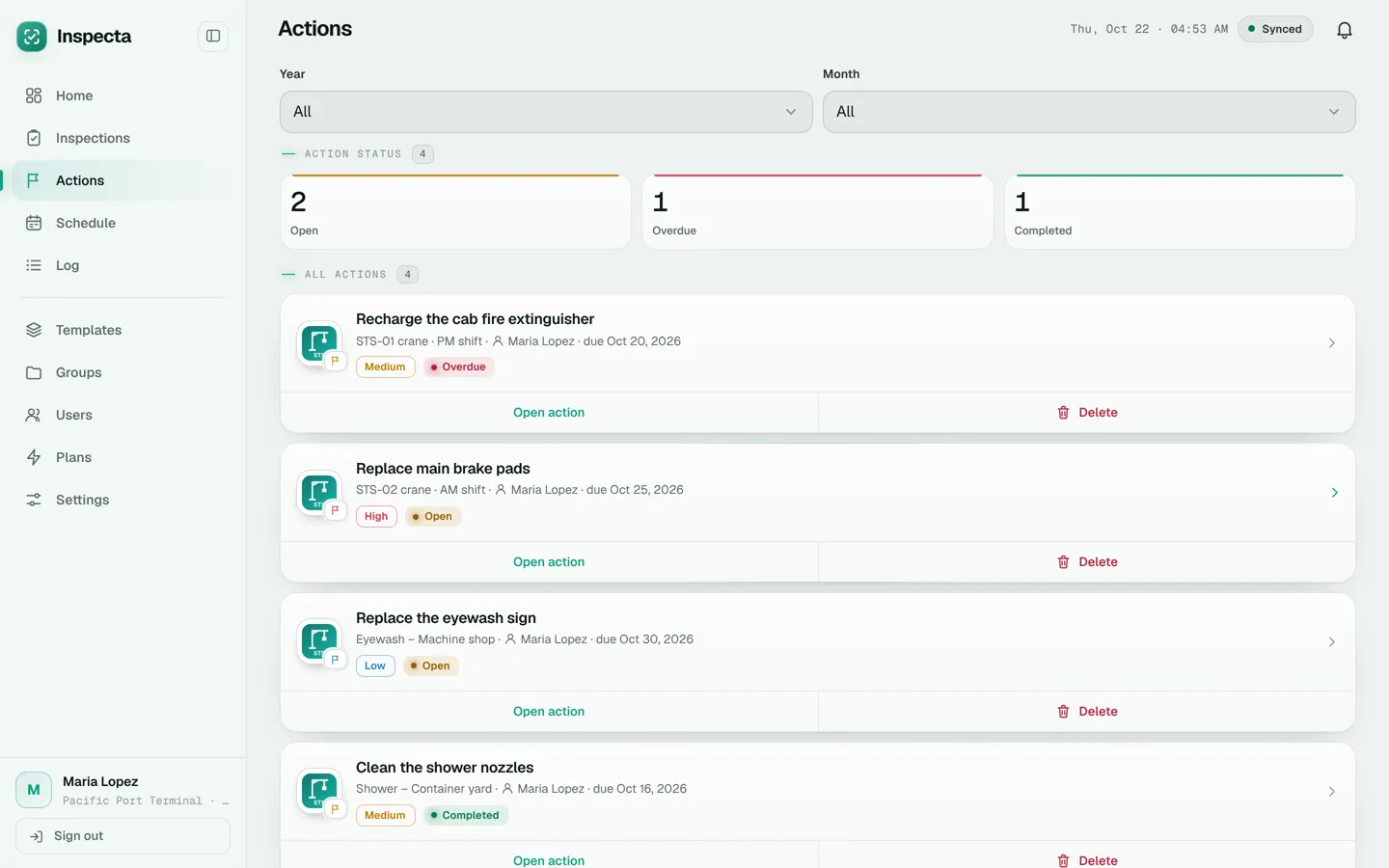
The dark theme is easy on the eyes on night shifts; the light one reads better in the sun. Every user picks their own.

Inspecta home dashboard: inspection point compliance, open corrective actions and upcoming due dates
Inspecta home dashboard in light theme

Pricing with taxes included.

Start free. Pay only if it works for you, in US dollars or quetzales, and cancel any time.

Free trial

$020 days

No card required

Every feature for 20 days, no card. Up to 2 admins, 2 inspectors and 3 checklists, and up to 3 AI checklists a day.

Start free

Pro

$22.40per month

or Q173.60 per month in quetzales · taxes included

Unlimited inspectors, up to 15 checklists and 10 AI checklists a day. Inspections, corrective actions and PDF reports, in the cloud and in the Android app for the whole team.

Try Pro free

Advanced

$33.60per month

or Q263.20 per month in quetzales · taxes included

Unlimited users and checklists, and up to 25 AI checklists a day. Inspections, corrective actions and PDF reports, in the cloud and in the Android app for the whole team.

Try Advanced free

Frequently asked questions

What is Inspecta?

Inspecta is inspection and audit software for field teams in any area that needs traceability: safety, quality, maintenance, food safety, environment and more. Use it to build checklists, fill them in on a phone with photos, signatures and location, get the PDF report and follow up the corrective actions for every finding.

How does AI create checklists?

You type the subject (for example, “Forklift inspection”), add details if you want and choose short, medium or full. AI builds the sections and questions with the app's question types, and the draft opens in the editor for you to review before saving. The free trial includes 3 a day, Pro 10 and Advanced 25.

Is it only for safety?

No. It works for any area that needs traceable inspections or audits: safety and HSE, quality, maintenance, food safety, environment, fleet, warehouse or supplier audits. You build the checklists with the points of your procedure.

Do I need to install anything?

No. Inspecta runs in the browser on any computer or phone. If your team uses Android, they can also install the app from inspectasafety.com.

Does it work without internet?

Yes. Inspections are filled in and finished offline, and sync when the connection is back. You do need a connection to sign in the first time.

How much does it cost?

The 20-day trial is free, no card. After that, Pro costs $22.40 per month (Q173.60) and Advanced $33.60 (Q263.20), taxes included.

How do I get started?

Create your admin account with your name, company and email. You get 2 sample checklists to try and can add your inspectors from Users.

Start inspecting today.

Create a free account

Create your admin account, get 2 sample checklists and 20 days with every feature. No credit card.